
Some Cool Tools for DX
tagged: AWS, ECR, Codebuild
 Thanks to David Schultz for making this photo available freely on unsplash 🎁
It was early 2024, and I had just become team lead.
I'd worked as a peer with the guys on the team, and had a great relationship with them. Picking up the mantle of team lead was a weighty one to bear.
After some prayer and reading, I decided to make Developer Experience (DX) a pillar of my efforts.
Fast forward to now, early 2026. I want to highlight four tangible DX improvements I've been able to bring to the team. As best I can gauge, and according to the team, these have made our lives easier as devs.
mTLS for cert headaches 🤮
Our flagship product is an IaC platform that we deploy on top of an AWS or Azure (or Oracle, but no one uses Oracle 😿) account. Included in that platform is a dashboard that displays statistics, analytics, user management, etc. For secret reasons this dashboard must run on mutual TLS, in which the server has to authenticate you.
For the purposes of DX means that you have to install certificates issued by the same CA that the server possesses, else you won't be able to load it.
We have about forty customers in production, which means forty different certs to install on our local machines, since each instance of our product generates its own unique CA and signer at deploy time.
Not to mention the few dashboards up in our internal account, for dev and master versions.
Also, modern browsers are terrible at caching client-side SSL state, so if you forget to install the certs before hitting the dashboard's URL, your browser will store the incorrect certs and map them to the domain name. The only way you can access the dashboard in this case is by using an icognito browser.
Super annoying.
Enter the mTLS server! This is a simple typescript server I wrote that middle-mans between your local and the dashboards, passing along the request and response, while transparently forwards the user's cert on every request!
It is config-driven, so you just give it the name of the environment you want to attach to. The little server git clones the directory in our internal customer/documentation repo containing the certs.
The blessed result of this is two-fold:
- no more cert madness
- we can now connect our local dashboards to any production customers'.
Local development containers for faster feedback
This one was by volume the biggest haul of all.
Our product, an IaC as mentioned before, is composed of many pieces - a database, storage, load balancers, lambdas and of course compute.
The compute pieces are two, both EC2 instances running the two vital pieces of our product.
Before local containers, every member of the team had their own complete instance of the product. You can imagine the cost of these resources, especially compute.
In addtion to large compute, only one change could be tested at a time, and that slowly. If I was working on one of those two compute apps, and wanted to test a change, I'd have to upload my built app to s3 and rerun the bootstrap script on the ec2 instance. Many times has someone on our team stepped on another's changes.
The local dev container solved this problem by reproducing the compute portion locally on the developer's laptop, and reducing the feedback loop to just compile and runtime, knocking off upload, check-with-team and bootstrap time.
I must say, it was a real bear doing this, as the app needs a Whole Bunch Of Config ™️ and some IAM shenanigans to connect with the other parts of the IaC running in the cloud.
Docusaurus for Documentation 🦖
This one was probably the easiest, but has taken the longest time toget buy-in from the team on.
The problem was simple - much of the relatively esoteric knowledge about our product and customers had become pigeonholed in the CTO and I. So, I looked for a good basic markdown-powered documentation site to organize this knowledge.
My requirements for the site were pretty simple - fast deploys, markdown-based, little to no UI to worry about.
Docusaurus fit perfectly for us.
We launched our own, and in the beginning I was the sole contributor. But after some time the CTO noticed how useful the site had become, as he himself began to rely on it.
So, he took a few 'documentation days' and poured a lot of his knowledge into the site.
He even asked for a public facing version, which I was happy to stand up! You can take a looksee here.
Every time we deploy a new instance of our product for a customer, some new records get added into our internal docs site - keys, customer notes, passwords and the like.
Thena and xMatters for Ticketin' over Slack 🦉
Our support workflows had grown untamed and in desperate need of some lower-level triage. The CTO was doing almost all the support on his own, and was fielding slack, email, teams and webex requests. Well, mostly he was.
We integrated thena to our Slack workspace to manage and organize customer requests, and we couldn't be happier! When the Thena bot is installed on any channel, every new message begins a ticket, and replies to the message are tracked as replies on the ticket. Thena also adds a kanban-style overlay view consisting of columns like Open, Waiting on Us, Waiting on Customer and Done. We've been able to export an entire history of tickets for customers when their renewal date is in sight, to help with new contract prices. This tool has been invaluable.
THena is great for slack. We still had to deal with email support requests; for that another member of our team set up an email inbox to automatically forward emails as tickets to Thena. This worked well, and initial email support which was spotty improved rather quickly.
Thena solved our ticketing problem by wrangling our Wild Wild West-style of slack and email support into manageable channels.
Next came the problem of how to handle support shifts.
Originally I planned on two team members on a weekly support shift. This did not work well because it led to what I'll call a "who's on first" situation - there was ambiguity on who would take an incoming ticket. Various slack bots that offered to manage a shift rotation did an absolutely horrendous job. My advice - never use any of them. Looking at you, Turnify.
Over time I discovered xMatters, which handled the shift rotation well. Additionally, xMatters provided a ui-based Flow Designer, which exposed api endpoints we could hit in slack to create incidents, manage vacation times, and retrieve the support calendar, all using custom javascript.
The support workflow calendar I GPT'd - it pulls the next six shift owners and displays their initials in a nice markdown format.
Here's the markdown from the 'Support Workflow Calendar' bot:
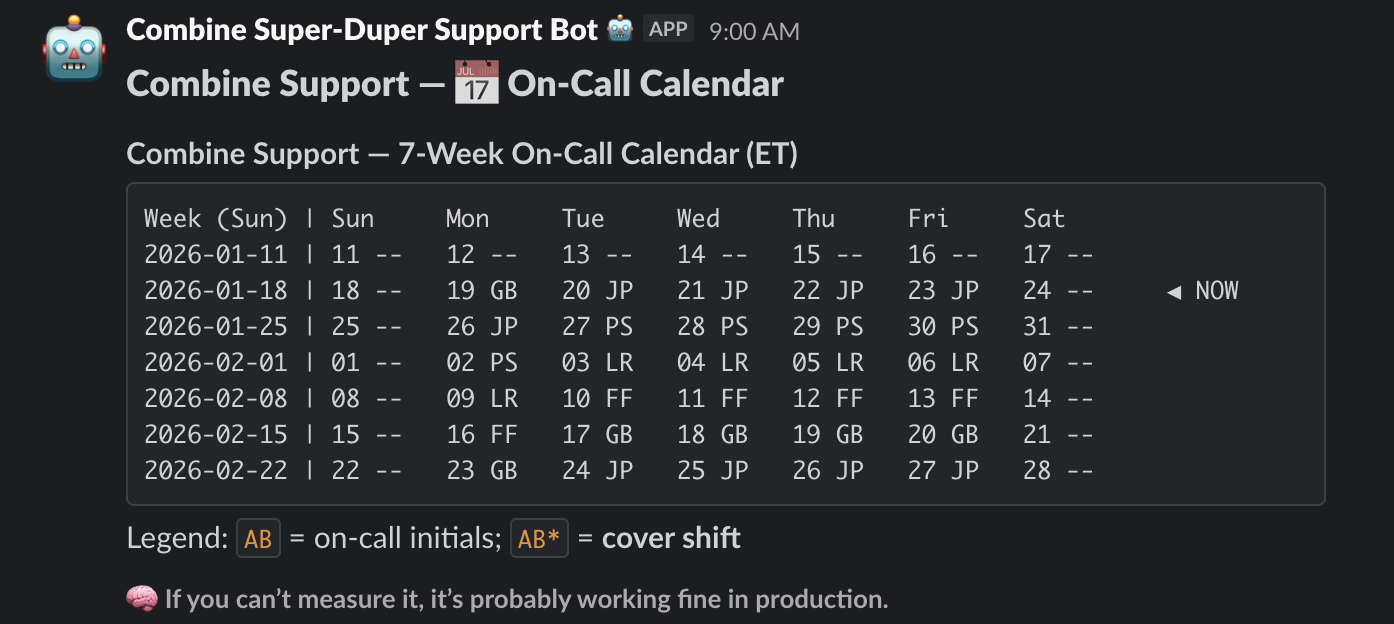
This workflow can be triggered manually by reacting to any message in our main channel with the 📆 emoji, and runs weekly on Tuesdays when we have our main sync.
Honorable Mentions
There were other efforts I took on to improve DX that are pretty standard fare for a team lead:
- Upgrade our apps as needed for improved speed for local and production, i.e. upgraded our app from Angular 13 to 21
- Detail our Github Project board in a helpful way with labels, alternate views, Definition of Done, and the like
- Establish good pointing etiquette and occasional retros to stimulate discussion